
NEWS
08-12, 2026
What Is an AI Server? Essential AI Infrastructure for Enterprise AI Adoption
What Is an AI Server? A Practical Guide for Enterprise AI Deployment
As generative AI, AI agents, computer vision, and smart manufacturing move into production, enterprises must answer a question that extends beyond model selection:
Where should AI workloads run?
Cloud AI can provide a fast starting point, but production applications may introduce new requirements for performance, latency, data control, reliability, and cost. An AI server provides dedicated computing resources for running AI models within a data center, enterprise environment, or edge location.
What Is an AI Server?
An AI server is a server designed to run artificial intelligence workloads using GPUs, NPUs, or other AI accelerators. It may support model training, fine-tuning, or inference, depending on its hardware and software architecture.
Common workloads include:
- Large Language Models
- Generative AI
- AI agents
- Retrieval-Augmented Generation
- Private AI assistants
- Computer vision
- Automated Optical Inspection
- Speech AI
- AI coding applications
Compared with a conventional server, an AI server places greater emphasis on parallel computing, accelerator memory, data throughput, cooling, power delivery, and continuous model execution.
Simply put:
A conventional server runs business systems and manages data. An AI server adds the specialized computing resources required to run AI models.
AI Server vs. Conventional Server
Conventional servers are commonly used for websites, databases, ERP systems, virtual machines, file storage, and other enterprise applications.
AI servers are designed for the intensive numerical operations and data movement required by AI models.
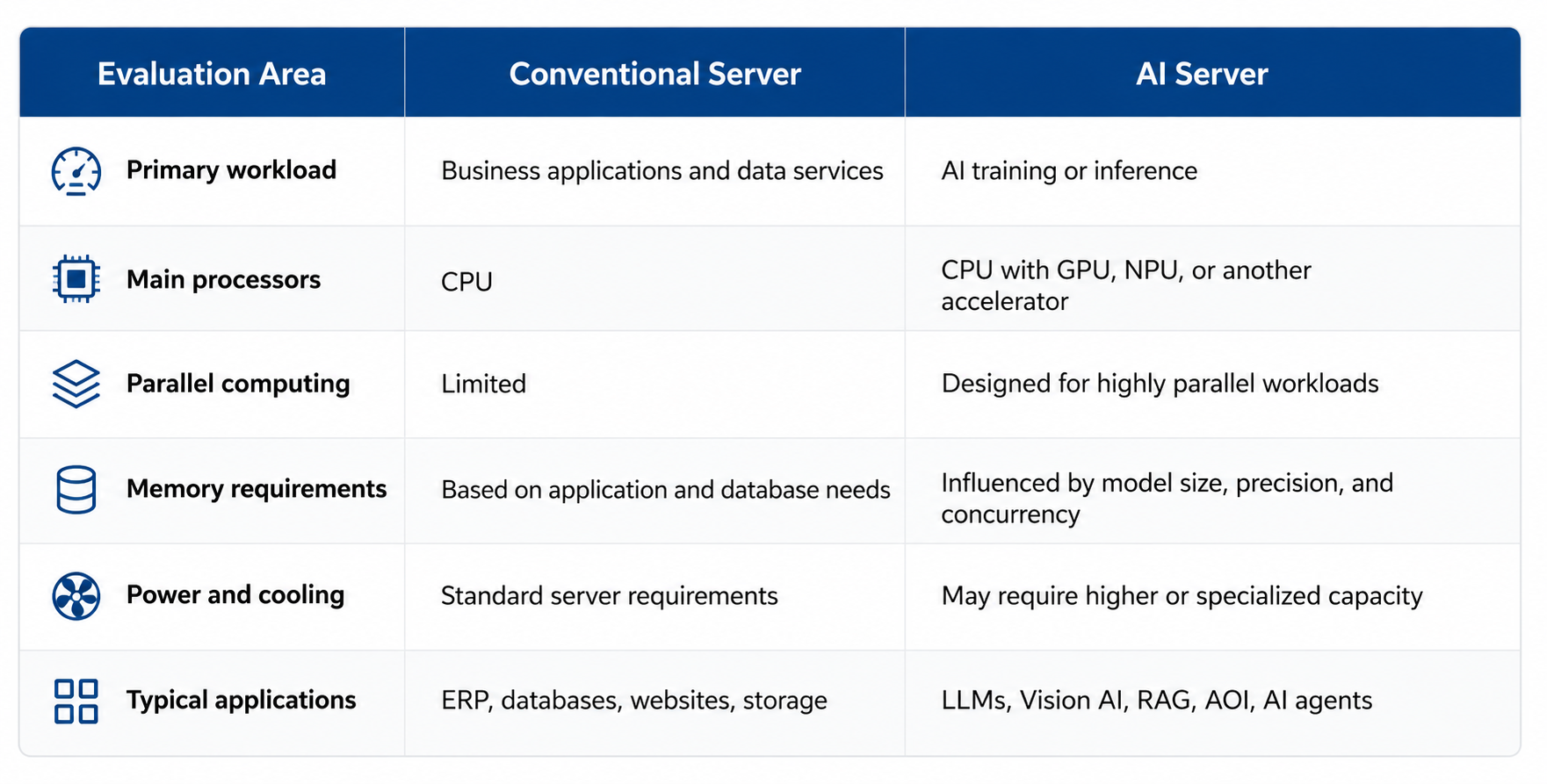
An organization running only conventional IT applications may not need an AI server. Dedicated AI infrastructure becomes relevant when models must operate continuously, process sensitive local data, or meet specific performance targets.
When Does an Enterprise Need an AI Server?
An enterprise should consider an AI server when AI has become a recurring production workload rather than a limited experiment.
AI Workloads Require Dedicated Performance
AI models can require substantially more computing and memory resources than conventional business applications.
A dedicated AI server prevents model inference from competing with databases, ERP systems, and other daily workloads for the same capacity. It also allows infrastructure to be sized for the model, number of users, response-time target, and expected request volume.
Data Must Remain in a Controlled Environment
Enterprise AI may process internal documents, customer information, production data, intellectual property, or research materials.
An on-premises AI server can keep model execution and data processing within an organization’s controlled environment. This provides greater control over data flow and system access, although security still depends on identity management, encryption, network design, monitoring, and maintenance.
Applications Require Low Latency
Automated inspection, real-time video analytics, equipment monitoring, and interactive AI services may require rapid responses.
Placing computing resources closer to users, cameras, machines, or data sources can reduce network dependency and improve responsiveness.
Usage Has Become Predictable
Cloud APIs are often convenient during development. As workloads become stable and usage grows, organizations may want to compare cloud spending with the total cost of owning and operating an AI server.
This calculation should include:
- Hardware acquisition
- Electricity and cooling
- Software and integration
- Maintenance and support
- Hardware utilization
- Future expansion
- Staff and operational requirements
More Models and Users Will Be Added
An enterprise may begin with one language model and later add RAG, AI agents, computer vision, speech processing, or coding models.
The infrastructure should support current requirements while retaining a realistic path for additional memory, storage, accelerators, models, and users.
What Can an AI Server Be Used For?
Private AI and Enterprise RAG
A Private AI environment allows an organization to run selected AI models under its own infrastructure and governance controls.
Retrieval-Augmented Generation, or RAG, retrieves relevant information from enterprise data before asking a language model to generate an answer.
Common applications include:
- Internal knowledge assistants
- Document search and question answering
- Product-information systems
- Technical-support tools
- Policy and procedure retrieval
AI Agents
AI agents use models, tools, data, and workflows to perform multi-step tasks.
An AI server can provide the inference and data-processing resources needed for agent applications. The complete system may also require databases, APIs, access controls, workflow engines, and monitoring.
Vision AI and AOI
Manufacturers can use AI servers for computer vision and Automated Optical Inspection, or AOI.
Applications include:
- Product-defect detection
- Production-line monitoring
- Object classification
- Safety-equipment detection
- Anomaly identification
- Image segmentation
Actual performance depends on the model, image resolution, camera count, frame rate, and required accuracy.
Speech and Language Applications
AI servers can also support compatible models for:
- Speech recognition
- Meeting transcription
- Text-to-speech
- Translation
- Summarization
- Code generation and analysis
Research and Model Evaluation
Universities, research institutions, software companies, and AI teams can use dedicated servers to test models, compare inference performance, and develop applications without depending entirely on external services.
Does an AI Server Always Need a GPU?
No. AI servers can use GPUs, NPUs, CPUs, or other accelerators depending on the workload.
GPU Servers
A GPU, or Graphics Processing Unit, provides highly parallel computing and broad support across AI frameworks.
GPU servers are commonly used for:
- Model training and fine-tuning
- Large or demanding AI models
- Generative AI
- Multimodal applications
- Image and video generation
- Diverse or frequently changing workloads
NPU Servers
An NPU, or Neural Processing Unit, is designed specifically to accelerate neural-network operations.
NPU servers may be suitable for:
- AI inference
- Enterprise language models
- AI agents
- Computer vision
- AOI
- Coding models
- Speech AI
- Workloads where performance per watt is important
NPU compatibility depends on the model architecture, operators, numerical precision, compiler, and software stack. Enterprises should confirm model support and benchmark real workloads before deployment.
The correct platform should be selected according to:
Model × Workload × Performance × Memory × Power × Software Compatibility × Deployment Environment
Cloud AI or an On-Premises AI Server?
Cloud AI and on-premises infrastructure serve different business requirements. Neither is automatically the better choice.
| Consideration | Cloud AI | On-Premises AI Server |
|---|---|---|
| Initial deployment | Usually faster | Requires planning and installation |
| Initial investment | Lower hardware investment | Requires hardware acquisition |
| Scaling | Flexible, subject to service availability | Limited by installed capacity |
| Data control | Depends on provider and service terms | Greater direct infrastructure control |
| Customization | Depends on platform | Greater control over supported software |
| Cost model | Usage-based | Capital and operating expenses |
| Operations | Provider manages more infrastructure | Enterprise manages the environment |
Cloud AI may be appropriate when usage is low or uncertain, the team needs rapid access to models, or internal infrastructure is unavailable.
An on-premises AI server may be worth evaluating when:
- AI usage is stable and continuous
- Data must remain within a controlled environment
- Low latency is required
- External connectivity is unreliable
- Specialized models or software must be deployed
- Long-term computing demand is predictable
Many organizations adopt Hybrid AI, assigning workloads to cloud, on-premises, and edge environments according to data sensitivity, performance, and cost.
How Should Enterprises Choose an AI Server?
Hardware specifications should not be the starting point. Enterprises should first define the workload and service requirements.
Before selecting a system, evaluate:
-
AI models
Which models, versions, frameworks, and numerical precisions must run? -
Use cases
Will the system support LLMs, RAG, AI agents, Vision AI, AOI, speech, or multiple workloads? -
Training or inference
Does the organization need full model training, fine-tuning, or inference only? -
Concurrent usage
How many users, applications, cameras, or requests must the system handle? -
Performance targets
What latency, throughput, accuracy, and availability are required? -
Memory and storage
Can the system hold the model and support datasets, vector databases, logs, and inference caches? -
Software compatibility
Are the model, runtime, libraries, drivers, and development tools supported? -
Power and cooling
Can the intended location operate the hardware reliably? -
Security and governance
How will identities, permissions, data, models, and system updates be managed? -
Scalability
Can the architecture support additional models, users, accelerators, or server nodes?
A proof of concept using representative models, prompts, images, and concurrency is recommended before production deployment.
EngineStar Enterprise AI Server Solutions
EngineStar provides AI server and computing solutions for enterprises evaluating dedicated AI infrastructure.
NPU-based options can support compatible inference workloads such as:
- Large Language Models
- AI agents
- Vision AI
- Automated Optical Inspection
- Private AI and RAG
- AI coding
- Speech AI
System selection should be based on the intended model, workload, performance target, software requirements, power conditions, and deployment environment.
Frequently Asked Questions
What is an AI server?
An AI server is a server designed to run AI workloads using GPUs, NPUs, or other accelerators. Depending on its architecture, it may support model training, fine-tuning, or inference.
What is the difference between an AI server and a conventional server?
A conventional server primarily runs business applications and data services. An AI server includes specialized computing resources for the parallel operations and memory demands of AI models.
Does every AI server need a GPU?
No. AI servers can use GPUs, NPUs, CPUs, or other accelerators. The correct architecture depends on model compatibility, performance, power consumption, and workload requirements.
Does every enterprise need its own AI server?
No. Organizations with limited or uncertain usage can begin with cloud AI. A dedicated server becomes more relevant when workloads are stable, data must remain local, or low latency and greater infrastructure control are required.
What applications can run on an AI server?
Common applications include LLMs, RAG, AI agents, Private AI, computer vision, AOI, speech processing, coding assistance, and model evaluation.
Start with the Workload, Not the Hardware
The first question should not be:
“Which AI server should we buy?”
Enterprises should first determine what problem the AI must solve, which models it will use, where the data should remain, how much performance is required, and how future workloads may grow.
Once those requirements are clear, it becomes easier to select an AI server that can support reliable, scalable, and long-term operation.
Contact EngineStar to discuss your AI models, workloads, and enterprise AI infrastructure requirements.
